
RatioLab user guide
Download and installation · Agent integration
Workspace
The application uses the Technical workspace: a persistent parameter panel on the left, a dominant 3D preview, a single motion bar and three geometric results below the model. The window displays the RatioLab name and RL icon.
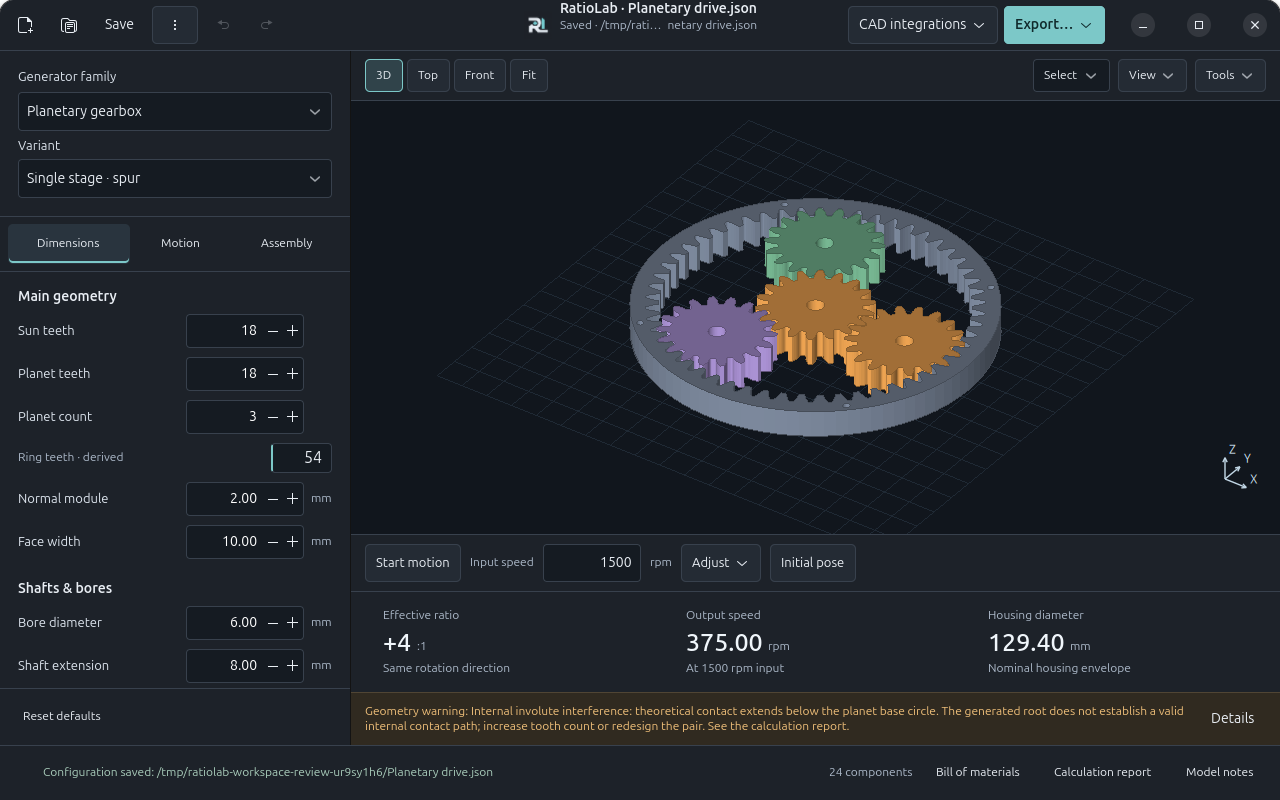
The parameter panel has three tabs:
- Dimensions: geometry, tooth counts, modules, profiles and clearances.
- Motion: input/output members, operating speed, torque and nominal loads.
- Assembly: bearings, fits, housing/flanges, standard hardware and existing eccentric shaft construction options.
Parameters update the preview and calculations automatically. Main geometry, shafts/bores and output connections are grouped; profile parameters and clearances are under Advanced. Nominal operating loads are collapsed under Motion. Read-only results show effective ratio/direction, output speed and a relevant geometric dimension; single gears show pitch diameter, tooth count and width. Nominal torque remains in the operating assumptions and calculation report, rather than appearing as a capacity rating.
New, Open…, Save, Save As…, Recent…, Undo / Redo and Export… stay in the header. The document line shows its full path and any unsaved changes. CAD integrations groups SolidCraft and Autodesk Fusion connection, status and creation. The bottom bar provides model status, component count, bill of materials, calculation report and notes. The panel remembers its active tab, advanced section and scroll position when choices rebuild its fields. Linked dimensions explain their source and provide Change source… to open the relevant Assembly section.
Invalid input remains visible, with a field message when the generator identifies the cause. Geometry actions are blocked immediately while an update is pending. Invalid geometry or speed stops motion; the last valid model of the same family remains visible with an explicit warning that it does not match the current parameters. No automatic correction replaces an invalid numeric entry on focus loss.
Saved configurations from earlier versions still load their geometry and kinematics. Obsolete material, stress and production settings are ignored and omitted from newly saved configurations and reports. Previously exported files remain independent snapshots.
Agent integration
RatioLab includes an offline MCP server with 13 tools for discovering the catalog, creating/editing/saving projects, Undo/Redo, inspecting components and BOMs, searching combinations, checking discrete interference and exporting STEP/STL/SVG/DXF or headless packages. The same generators and validators are used by the desktop app. Files stay in an explicitly configured workspace; project revisions prevent stale edits and existing outputs are preserved.
Native installers include the RatioLab-MCP console companion (.exe on
Windows). Python installations provide ratiolab-mcp; headless use needs no
GTK/OpenGL session, CAD application, API key or additional Python packages.
See MCP.md for commands, Codex/client configuration, tool contracts
and limits. MCP projects exchange compatible JSON files with the GUI; the
server maintains its own project handles rather than controlling an open window.
Active catalog
These ten families are available, in this order:
| Family | Main variants or purpose |
|---|---|
| Spur gear | Single involute gear |
| Helical gear | Adjustable helix angle and hand |
| Double helical gear | Joined helices or separated by a groove |
| Planetary gearbox | Spur, helical, double helical, one or two stages |
| Cycloidal reducer | Single or dual disc with opposing eccentrics |
| Strain wave reducer | Cup, flat cup, silk hat; generated matching ring |
| Worm and wheel | Cylindrical ZA / ZI with generated wheel |
| Parallel shaft reducer | Spur, helical, double helical |
| Internal gear reducer | Fixed axes; spur, helical, double helical |
| Bevel differential | Wrist or classic configuration; straight or spiral bevel gears |
Unsupported families are rejected by both the interface and generator. Previously exported files remain independent artifacts.
Bevel differential
Choose Bevel differential with its default Wrist configuration to generate three bevel gears, two independent input stub shafts, an open carrier and a drilled output flange. Belts, pulleys and motors are not generated; add the external drive in your CAD. Set the module, input/output tooth counts, face width, shaft diameters and flange dimensions in Dimensions and Assembly. Supports reveals the carrier and nominal bearing envelopes and is enabled on the first visit to this family.
The choices are independent. In Assembly, Output connection selects the original drilled flange, a solid shaft or a hollow shaft. Solid and hollow shafts have an extension measured beyond the output carrier face. Hollow shafts have a real continuous coaxial passage through the output gear/shaft/hub assembly, with a minimum 1 mm shaft wall. This is the local output passage; it does not establish an unrestricted cable route through the whole wrist or through its tilt range. Flange-only dimensions and the hollow-passage dimension are hidden when they do not apply.
Carrier construction offers the original open carrier or split members with open bearing-seat halves. The split cheeks and bridges remain separate parts; bridge lap tabs have matching joining holes, an axial clearance gap and at least 1 mm layer thickness. Bridge ends butt against the cheek faces. Choose the joining hole diameter and complete fastener selection, axial retention and clamping in CAD; no stock fasteners or validated clamp capacity are inferred.
In Dimensions, Side / output tooth ratio offers custom counts, 1:1 teeth or Relative spin reduction 2:1. The latter derives twice as many output teeth as side teeth (up to 30 side teeth), reducing relative output spin by two while retaining the carrier mean-speed equation. Derived output teeth are read-only with Change source…; choose Custom to edit both counts. Exploring presets preserves the earlier custom count in the current editing session. Old configurations retain the original flange/open construction and their custom counts. A hollow shaft / split carrier example demonstrates the independent choices.
Set signed Input A speed in the motion bar and Input B speed under Motion. The Tilt, Spin and Combined buttons demonstrate 12/12, 12/−12 and 12/0 rpm inputs. Both signs refer to the same world +X direction, although the input shafts emerge on opposite sides. Equal speeds rotate the carrier about X; opposing speeds rotate the output about its carrier's Z axis. Results show both output speeds rather than a single reduction ratio. No combined power balance or output torque is calculated without independent load data.
The ideal equations are carrier = (A+B)/2 and
output spin = (side teeth/output teeth) × (B−A)/2. Output spin is relative to
the moving carrier. The working flanks are exact spherical involutes, with an
optional logarithmic spiral trace. Pressure angle is transverse. The planar end
caps form a custom blank, not a KHK standard full-depth blank. The generator
checks the common normal, root domain and continuous availability of ideal tooth
engagement; combinations with gaps between successive contacts are rejected.
Face width is limited to one third of the cone distance. Bearings and retention
require completion in CAD. STEP/STL share the preview surfaces in the nominal
pose; SVG/DXF are sections, not cutting templates. Start with the
example configuration.
The construction selector offers Straight bevel and Spiral bevel. Spiral exposes an unsigned angle (0–45°) and local input hand (−1 or +1). Both inputs use the selected local hand; the perpendicular output uses the opposite hand. Sections retain fixed circular bores. Zero angle reproduces the straight geometry exactly. Profile refinement and spiral trace chords use a 0.003 mm sampling criterion; this is not a global surface-error proof or a manufacturing tolerance. Faceted surfaces, especially at zero backlash, still need discrete motion checks. See the spiral example and the equations, references, custom blank and geometry limits.
The independent Differential configuration selector also offers Classic: direct carrier input, two coaxial side outputs and an internal spider bevel on a carrier-fixed pin. The perpendicular wrist output shaft/flange is removed. A drilled annular carrier input mount clears side output A; the full mount thickness is reserved before the side output's exposed extension. Choose solid, hollow or flanged connections for both side outputs. Hollow side passages are local; the spider and pin can obstruct a route through the complete mechanism. Spider pin diameter and positive radial running clearance are explicit; axial retainers and all mounting/fastening interfaces remain nominal.
For Classic, set Carrier input speed in the motion bar and Prescribed side
speed difference B−A under Motion. Outputs are A=C−(B−A)/2 and
B=C+(B−A)/2, with all signs about world +X. The difference is a visualization
boundary condition, not a second motor or a speed split predicted from loads.
Equal, A held and Counterrotate demonstrate 12/0, 12/24 and 0/24 rpm
carrier/difference settings. A held is a prescribed zero side speed, not a
physical differential lock. Results and component roles identify the carrier
input, two outputs and internal spider; no output torque or traction is inferred.
The classic example can be
opened directly. No crown/pinion input stage, belts, pulleys or motors are generated.
Preview and motion
Drag to rotate, scroll to zoom, and double click or use Fit to reset the camera. Supports, Housing, Exploded and Section control the view. Cycloidal output pins remain visible when Supports is disabled, in both single and dual disc variants.
Use the single motion bar below the preview: Start motion / Pause, a precise RPM entry, Adjust and Initial pose. Adjust opens a progressive RPM slider and ±1 controls; playback is not duplicated in that popover. Press Enter or leave the entry to apply; both decimal points and commas are accepted. All inputs at zero freeze the phase. Changing only valid RPM preserves the current phase.
Closing Adjust does not stop playback. Starting motion returns from exploded view to the assembly pose. At high speeds, video sampling may cause visual aliasing.
Animation illustrates kinematics. It does not verify continuous contact, collisions, force, fatigue or usable travel. CAD and STL exports use the nominal assembly pose; a complete export resets the preview before saving the PNG.
The preview panel shows geometry warnings for single-gear undercut and gear-pair interference. They update from calculation data when dimensions change; full warnings remain available in the calculation report and model notes.
Check interference… opens a discrete 3D check of every component, including hidden supports and housing. Choose the phase step, boundary tolerance in mm and time limit, then Check cycle. The full labelled orientation/orbit period is computed from the actual motion plan; the report distinguishes that period from a truncated prefix. The worker reports progress and supports Cancel. Select a result to highlight its two components at the reported phase; the preview overlay and Restore preview leave this temporary inspection view. Parameters, Undo history and export geometry do not change. Editing, invalid input, document replacement and closing invalidate obsolete results immediately.
The checker measures Euclidean distances on the shared preview/STL triangles, including holes, concavities and 3D frames. Analytic cylinders in STEP can differ from these facets. It separates positive clearance, boundary contact / unresolved potential overlap, intersection with an interior witness, and containment with positive surface margin. Expected constructed interfaces are annotated; their intersections remain visible and suspect. Any reported depth is a witness clearance lower bound, not exact penetration / minimum translation distance. Save the detailed report from the check window. Results aggregate the minimum surface distance per pair and observed class, with a selectable sample pose.
This is discrete sampling, not continuous collision certification. Limits are 721 poses, 128 parts, 300,000 triangles and the selected time budget (default 120 seconds). Unfinished or unsupported checks are explicitly incomplete. Rigid closed triangle surfaces and the known prescribed flexspline material map are supported. The flexspline is rebuilt at each pose from its immutable reference coordinates with the same triangle connectivity; stale or missing references, unknown deformation and arbitrary warps fail explicitly. Generated worm and bevel working geometry and the prescribed strain-wave envelope do not establish continuous clearance or elastic response. Near-collinear triangulation faces retain topology and use edge/point distances, with altitude below tolerance / 100.
Components and surface measurements
Click a visible surface to select its component; Ctrl/Shift adds or removes parts. Components / measure… provides a multiple-selection list with source indices, names, BOM codes and visibility. Duplicate names remain distinct. Isolate selected reveals only those source positions, including explicitly selected supports or housing; Restore filters restores the previous view. Selection and inspection do not change parameters or Undo history. Parameter edits and document replacement clear obsolete selections and measurements.
Measure two surface points shows A/B in the preview, world XYZ coordinates and straight point-to-point distance in mm. The first click pauses the displayed pose; results identify nominal, motion/inspection or exploded coordinates. Component dimensions are nominal sampled XYZ bounds. Measurements use shared preview/STL facets; six decimals are display precision, not an exact CAD diameter or a manufacturing tolerance. Animated flex/warp surface picking is explicitly unavailable: use Use nominal pose to inspect the nominal sampled geometry.
The component window offers STEP, STL, DXF / SVG and Selected package for the chosen source indices only. Supports, housing and hardware are included only when selected. These files retain nominal assembly coordinates, source names/indices, selective BOM quantities and explicit subset metadata; view explosion, section and motion never become export geometry. Selected packages include portable CAD scripts/assets and checksums. Their parameter JSON and calculation report describe the source configuration; replay the CAD script to recreate the subset. The header's existing complete exports continue to include every component, regardless of selection or isolation.
Find geometric combinations
Find combinations… searches the selected parallel, internal, planetary, cycloidal, strain wave or worm assembly. A single gear has no independent transmission ratio. Enter the target magnitude |input speed / output speed|, relative tolerance in percent, and either sign, same (+), or opposite (−) direction. The current I/O connection and each planetary stage remain fixed.
The Search dock guides you through Desired ratio, Parameters to explore and Compare results. The ratio example and accepted interval update as you enter the target and relative tolerance. A ratio below 1 describes an output speed greater than the input speed. Direction follows the selected members and their displayed axes, rather than an assumed reducer direction.
For each available tooth/roller count, planet count, module, width or cycloidal pitch radius, choose Keep current or Vary. Set From, To and Step with ordinary numeric fields; no grid syntax is required. Counts must be whole numbers. Initial count ranges are a local ±4 window, clipped to parameter limits (strain wave teeth use step 2); planet count and continuous dimensions initially stay fixed. The finite candidate count updates immediately. Invalid required inputs show a field message and disable Search until corrected.
For nonuniform lists or compound grids, choose Custom values (advanced) for
that parameter and enter comma-separated numbers or inclusive low:high:step
grids. Range and Custom values keep separate drafts when you switch between
them; only the selected mode is searched. Keep current preserves these
drafts too. No custom list is automatically resampled into a range. Each varying
parameter accepts at most 1,000 distinct values.
Overall size limits groups the XYZ limits; the active limits stay visible in the dock, including while settings are collapsed. Advanced contains time and candidate budgets and the full technical report. Default budgets are 50,000 visited candidates and 30 seconds. Results distinguish a complete domain from a partial or cancelled search. For no matches, review ratio, ranges and size limits; for partial coverage, also review the Advanced budgets before another search. No constraint is relaxed automatically. Generation and surface section construction are cooperative stop units.
Other dimensions, variants, number of stages, I/O, bearings and hardware stay fixed. A candidate that would silently normalize a fixed dimension or an enumerated value is rejected. This is a finite local search, not continuous optimization or a global optimum claim.
Each retained proposal passes the definitive generator and uses its actual signed analysis ratio, including reverse connections and all stages. XYZ limits use the nominal bounding box of the sampled shared preview/STL surface in world axes and millimetres, including all generated supports, housing and hardware regardless of view filters. This is the export pose rather than a motion swept envelope. Analytic circles in STEP can extend slightly beyond the sampled bound. No interference, strength or load rating is inferred.
Proposals show ratio, error, overall XYZ size in mm and human-readable parameter changes as Current → Proposed, with ratio magnitude and rotation direction shown separately. Results and Apply stay visible while comparing. Open Edit search settings to return to the form; Results returns to the existing comparison until an edit invalidates it. Search and Cancel remain at the bottom of the dock. Ranking uses ratio error, bounding box volume, then XYZ lengths; at most 100 best proposals from the visited domain are retained. Equivalent parameter sets are deduplicated; equal ratios with different geometry remain separate. Select a proposal and press Apply selected to change the current document as one Undo step. Undo/Redo preserve its identity, path, save checkpoint and other families. Search itself never modifies parameters. Model/request edits, invalid numeric drafts, replacement and closing invalidate old proposals; Apply also invalidates interference checks. Save report… records the grids, locked baseline, budgets, coverage and retained proposals.
Input and output connections
Motion → Drive · input and output selects which member is driven, which delivers motion, and which is fixed. Planetary, cycloidal and strain wave drives offer all six physical member combinations. The planetary two-stage variants have independent connections for each stage.
Parallel shaft, internal gear and worm drives offer forward/reverse operation. Reverse kinematics do not guarantee worm backdrivability. Role colors and nominal mounting interfaces follow the selected arrangement; see IO-MODELS.md.
Printed cycloidal eccentric shaft
Cycloidal models offer Eccentric shaft construction → FDM · printed shaft + 2 through bolts in both modes. The printed shaft/cam stack is held by an asymmetric pair of off-axis M3 bolts, with removable bearing retainers, recessed heads, washers and nuts. It uses dedicated NSK 6804 eccentric bearings. Both single and dual disc builds keep the shaft and its metal reinforcement visible without Supports.
The selector preserves the entered shaft diameter and disc thickness. If they are incompatible, use Apply compatible FDM dimensions explicitly: input shaft Ø17 mm, bearing seat Ø32.2 mm and disc thickness 16 mm. The seat is linked to the 6804 bearing plus allowance. With eccentric input, choose either pin flange output with a fixed ring or Ring / housing output with a fixed pin flange. Housing output adds an annular six-hole load flange and a separate eight-hole stationary frame connection while preserving the two-bolt shaft. Other driving members and general automatic hardware require the standard construction. Example configurations are in examples/. Assembly, fit calibration, limitations and primary research sources are in PRINTED-SHAFT.md. This is an untested physical prototype, without a load rating or a universal motor coupling.
Bearings and hardware
The verified local NSK catalog provides nominal open deep groove ball bearing dimensions and official source links. It does not automatically substitute sealed variants, other clearances or manufacturers. Linked dimensions are highlighted and locked in the interface.
Automatic bearing and hardware options cover supported single spur/helical/double helical gears, planetary and cycloidal assemblies, plus fixed-axis shaft supports: both shafts for parallel reducers, and the pinion shaft only for internal reducers. The internal ring output still needs a dedicated annular bearing/support. The new supports share their real seats, shafts, applicable grooves, keys and spacers across preview, CAD, STL and BOM. Forward/reverse connections preserve the physical shaft ownership of rotating hardware.
Bearing-in-bore and common flange screws are disabled with reasons for parallel/internal pairs; their independent bearing blocks do not form a common frame. Generic automation is explicitly disabled for crossed-axis worm and deforming strain-wave constructions and the dedicated printed eccentric construction. Catalog omissions, such as keys or external retainers unavailable at a selected shaft diameter, are explained beside the controls and in BOM requirements. Existing supported assemblies retain their flange fastener options.
Grooves, keyways and through holes are represented in the shared geometry. Commercial hardware is simplified: threads, drive recesses and bearing raceways are not fully modelled. Codes are assigned only when selected from the catalog; unresolved envelopes remain TO BE DEFINED. Custom spacers are MANUFACTURE items.
Save, load and export
New, Open…, Save and Save As… manage parameter JSON files in the existing solidcraft-riduttori/1 format. Save updates the current file; an untitled project asks for a path. New, Open and window close offer Save / Discard / Cancel when edits are unsaved. Cancelled or failed operations preserve the active project. Recent files include missing paths, which report a load error without replacing the project.
Undo / Redo restore parameters, family, variant and assembly options. Consecutive edits to one field are grouped for 0.7 seconds; switching fields, saving or traversing history starts a new group. Reset defaults is undoable. Animation and view controls do not add history. Numeric text keeps its full float precision through focus changes; incomplete text remains an unsaved edit and cannot be saved as a normal configuration.
A separate recovery record stores unsaved edits, including incomplete numeric text, in the per-user application data directory under projects/recovery/. On the next launch, choose Restore, Discard recovery or Keep for later. Corrupt records are reported and kept until explicitly discarded. Save and deliberate discard clear the current session's recovery; forced process/window destruction leaves it available. Recovery contains the current draft and clean checkpoint, while the in-memory undo history is limited to 200 changes. The project line reports filesystem failures affecting recovery. Recent paths live in projects/recent-projects.json beside that directory. Each session captures its own paths and uses a distinct recovery filename.
Keyboard shortcuts: Ctrl+N (New), Ctrl+O (Open), Ctrl+S (Save), Ctrl+Shift+S (Save As), Ctrl+Z (Undo), Ctrl+Shift+Z or Ctrl+Y (Redo), Ctrl+W (Close), and Ctrl+E (Export). File actions and close wait for an active export or CAD operation to finish.
Export… remembers the destination folder and provides:
- STL for 3D printing: a binary assembly STL and a
.stl-parts/folder with one STL per component. - STEP for CAD: a
.step-export/folder withassembly.step, one STEP per component instep-parts/, and approximation details instep-info.json. All catalog families and their variants are supported without a SolidCraft installation. - SVG / DXF profiles: a
.profiles-export/folder with closed outer contours and holes, in local section coordinates.profiles.jsonrecords axial positions, rotations and world placement. Helical and deformed parts are explicitly labelled sections only, rather than complete extrusion profiles or manufacturing developments. - Complete package: one
.package/folder containing standalone assembly/component STEP, SVG/DXF profiles, STL files, parameter JSON, CAD script and required assets, preview PNG, BOM and calculation reports.manifest.jsonlists checksums for every exported file. - BOM and calculations: TXT, CSV and JSON component lists plus
.calculations.txtand.calculations.jsonreports.
STL coordinates are in millimetres; select mm in the importer because STL has no unit field. The header export actions include all parts, including hidden supports, housing and nominal commercial components; use the component window for an explicit subset. Individual parts retain assembly coordinates and can be arranged on the slicer bed. STL export does not require SolidCraft.
STEP declares millimetres and retains distinct named bodies in their nominal assembly positions. Proven circular constructions with constant radius and axis become true cylindrical surfaces, including invariant bores in twisted parts. Tooth contours retain their sampled segments; helical, grooved and deformed surfaces keep their shared planar geometry where a whole cylindrical wall cannot represent them. step-info.json reports the measured radial difference from the sampled wall triangles, sampled and theoretical CAD volumes, and their difference. This is a limited circular-surface improvement, not an analytical reconstruction of tooth flanks or freeform geometry. CAD reader mass properties can introduce their own numerical approximation.
SVG uses physical mm dimensions and a one-to-one coordinate scale. DXF declares $INSUNITS=4 (mm), with closed OUTER and HOLES polylines. Both retain the sampled section contours. Their XY coordinates are local to each section; apply the occurrence transform in profiles.json when positioning them in an assembly. A section through a deformed flexspline is not its undeformed manufacturing shape.
STEP, profile and complete-package folders are published only after every file succeeds. Existing exports are preserved; failed operations clean their temporary output. The complete package waits for a finished PNG before publication. STL assembly/component exports also preserve existing results and remove newly created files if publication fails. An interrupted process can leave a hidden staging directory or reservation file; these do not represent a completed export.
BOM and calculation windows support text search, previous/next matches and Copy all. Invalid configurations prevent geometry exports and CAD creation.
Create in Autodesk Fusion
Under CAD integrations, install and run RatioLabBridge in Fusion, then use Connect / check Fusion and Create in Fusion. Each send adds a new component containing STEP solids, child components, RatioLab parameters and BOM metadata. See the Fusion setup and transfer guide for installation, supported designs, import checks and the distinction between STEP solids and native Fusion parametric features.
Create in SolidCraft
Under CAD integrations, Connect SolidCraft connects to the authenticated local control service on port 7878 or launches the configured AppImage. Create in SolidCraft adds a new unique group to the active CAD document. Finish any active sketch before insertion. Save the document as .solidcraft or export it from CAD.
Each send creates a separate group; changing the generator does not update existing CAD bodies. Regenerate and remove the old group when replacing a design. Straight parts use native sketches and extrusions where possible. Twisted and other shared surfaces use faceted STEP BRep solids with explicit hole walls. CAD uses the same sampled coordinates as the preview rather than an interpolated smooth loft.
A checkpoint spans modelling batches and STEP imports. Failed commands or imports request restoration of the prior document and history. Imports with warnings are rejected. If a connection is interrupted, check SolidCraft before retrying: a received operation may still be running.
Compatible command scripts can also be replayed with:
solidcraft-cli run model.script.json --out part.step
For a complete package, run this command from inside the package directory. Its STEP references are relative to that directory, so the whole package can be moved together. The CAD script retains the existing native-sketch/faceted-surface path; the standalone assembly.step uses the circular-surface improvements described above.
Accuracy and limitations
These are dimensional design models, not certified production designs. Materials, manufacturing tolerances, lubrication, seals, fastening details, strength, bearing life and load capacity must be defined and verified. Reports provide nominal geometry, contact ratios, kinematic relations and static force estimates using assumed operating data; no ISO/AGMA strength verification is performed.
External cylindrical gears use a rounded normal rack envelope at the root, with trimming against the usable involute where undercut occurs. The tool's normal circular corner becomes an ellipse in transverse helical sections. Internal gears use a circular blend tangent to the involute and dedendum circle; a pinion-cutter envelope and cutter interference checks remain unimplemented. Involutes and root curves use adaptive midpoint/quarter checks at a nominal 0.015 mm chord threshold. Shared circular profiles use a maximum radial sampling deviation of 0.002 mm where specified. These sample thresholds do not certify global analytical profile error. Tool parameters, method, domain and usable involute limits are recorded in the calculation and CAD/profile metadata. The reports retain nominal contact ratios and additionally report usable involute contact ratios after root trimming/blending. Worm wheels use the matching screw helicoid envelope, including the swept generating-tip root transition. Strain-wave rings use the full swept outline of a thickened matching flexible tooth under the prescribed ellipse pitch-arc/normal map; the same material map drives animation and interference checks. Numerical ring enclosure relief is recorded separately from reference tooth backlash. These constructions and the spherical involute bevel flanks are documented with their supported domains and numerical limits in the worm, strain-wave and differential references. Tubes and freeform surfaces use their documented sampling. Complex bodies have a 250,000 face limit.
Strain-wave deformation is prescribed, without an elastic or loaded-contact solution. Reference tooth-thickness allowance does not establish loaded rotational lost motion. Nominal interface contact is not proof of torque transmission. Tests on presets do not certify all parameter combinations.