
Planetary gear generator: a 4:1 worked example
Generate a planetary gear set with RatioLab, inspect its motion and export the geometry as STEP or STL. This free, open-source example works in the browser and in the desktop app. The project below contains the actual parameters used for this guide, so you can start with a complete design.
Download the planetary project or open the web app.
Open the example
- Download the project JSON using the link above.
- Open RatioLab in your browser, or launch the desktop app.
- In the browser, choose Project → Open project… and select the JSON file. On desktop, use Open project. Save any existing work before replacing it.
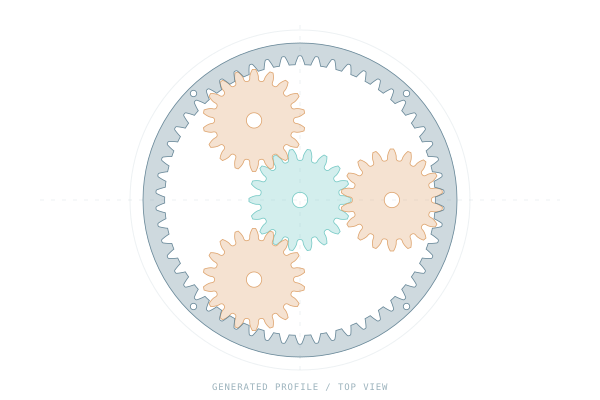
- Inspect the generated planetary assembly. The illustration above hides the supporting parts to make the gear profiles easier to see; the project retains the complete model.
Understand the parameters
| Parameter | Example value | What it controls |
|---|---|---|
| Construction | Single stage, spur | One planetary stage with straight teeth |
| Sun teeth | 18 | Teeth on the central input gear |
| Planet teeth | 18 | Teeth on each planet |
| Number of planets | 3 | Equally spaced planet gears |
| Ring teeth | 54, derived | The internal ring for this sun and planet combination |
| Module | 2 mm | Nominal tooth size |
| Face width | 10 mm | Axial width of the gears |
| Input speed | 60 rpm | Prescribed speed of the sun |
For this single-stage arrangement, the ring tooth count is derived from
18 + 2 × 18 = 54. With the ring fixed, sun input and carrier output, the ideal
reduction is 1 + 54 / 18 = 4. The carrier therefore turns at 15 rpm for a
60 rpm sun input, in the same direction about the common axis.
Preview and change the design
Use the motion controls to play and pause the mechanism. Orbit the model to see the sun, planets and carrier. The carrier carries the planet axes around the sun; the planets also spin about their own axes.
As a first edit, change the module from 2 mm to 2.5 mm, keeping the tooth counts unchanged. The gears become larger, while the ideal 4:1 reduction stays the same. Review the regenerated model and any validation messages before export.
Export STEP or STL
Choose Export and select the available STEP or STL option. STEP is useful for continuing the design in CAD; STL exports the triangulated surfaces. Check the component selection and scope in the export dialog before saving.
You can also save the modified project as JSON and reopen it later in RatioLab. The user guide explains project handling and export options; the browser guide covers browser requirements and limits.
What this example establishes
This is nominal gear geometry with prescribed, ideal kinematic motion. Its ratio does not establish a load rating, service life or manufacturing readiness. See the calculation references and motion conventions for the model's scope.
Continue with the cycloidal drive example to explore a different way to obtain a reduction.